








The 9 best GA4 alternatives for apps and websites


Contents
Google Analytics 4 is one of the most widely deployed analytics tools in the world – and one of the most complained about too.
The transition from Universal Analytics forced millions of users onto a platform that thinks and behaves very differently.
GA4's event-based model is more powerful than its predecessor in theory, but in practice, many teams find it harder to use, harder to query, and harder to trust. Add in data sampling on large exploration queries, a 14-month retention limit, privacy concerns under GDPR, opaque pricing, and a UI that frustrates marketers and developers alike – and it's easy to understand why so many teams are looking for alternatives.
Whether you're leaving GA4 for privacy reasons, because you've outgrown its free tier limits, or because you simply need more than web analytics, this guide covers the best GA4 alternatives available today.
What is the difference between Universal Analytics and GA4?
The core difference is how each tool tracks activity.
Universal Analytics was session-based – designed for a time when desktop websites were the norm and cookies were uncontroversial. It's good at tracking sessions, pageviews, and traffic sources, with pre-defined reports that made it easy for marketing teams to do their jobs without data science support.
Google Analytics 4 is event-based – designed to track what people actually do, like clicking a button or completing (or abandoning) an action. Its model is more flexible and powerful, but it lacks many of the pre-defined reports UA users relied on, and its emphasis on exporting to Looker Studio or BigQuery is harder for teams without analytics support.
Why do people dislike GA4?
If event-based tracking is more powerful, why do so many people complain about GA4? Users tend to fall into one of three camps:
Users who miss pre-defined reports – GA4 removed many of the reports teams relied on. Things are harder to find, and there's no guarantee popular reports will return.
Teams without data science support – GA4 caters more to large enterprises and app developers. Its reliance on Looker Studio and BigQuery exports is a barrier for small business and marketing teams who don't have analytics engineers.
App developers who need more – Despite courting app developers, GA4 still falls short of alternatives that pulled users away from Universal Analytics in the first place. For many, it's too little, too late.
Some teams also avoid GA4 for privacy reasons. GA4 is not GDPR-compliant by default – it requires additional configuration including consent banners and Consent Mode v2. The 2023 EU-U.S. Data Privacy Framework resolved the underlying data transfer concern, though the framework remains subject to legal and political uncertainty.
1. PostHog
- Best for: Startups, engineers, and product teams
- Tracking method: Event-based
- GDPR compliance: ✔ (via self-hosting or EU Cloud)
- GA data import: ✖
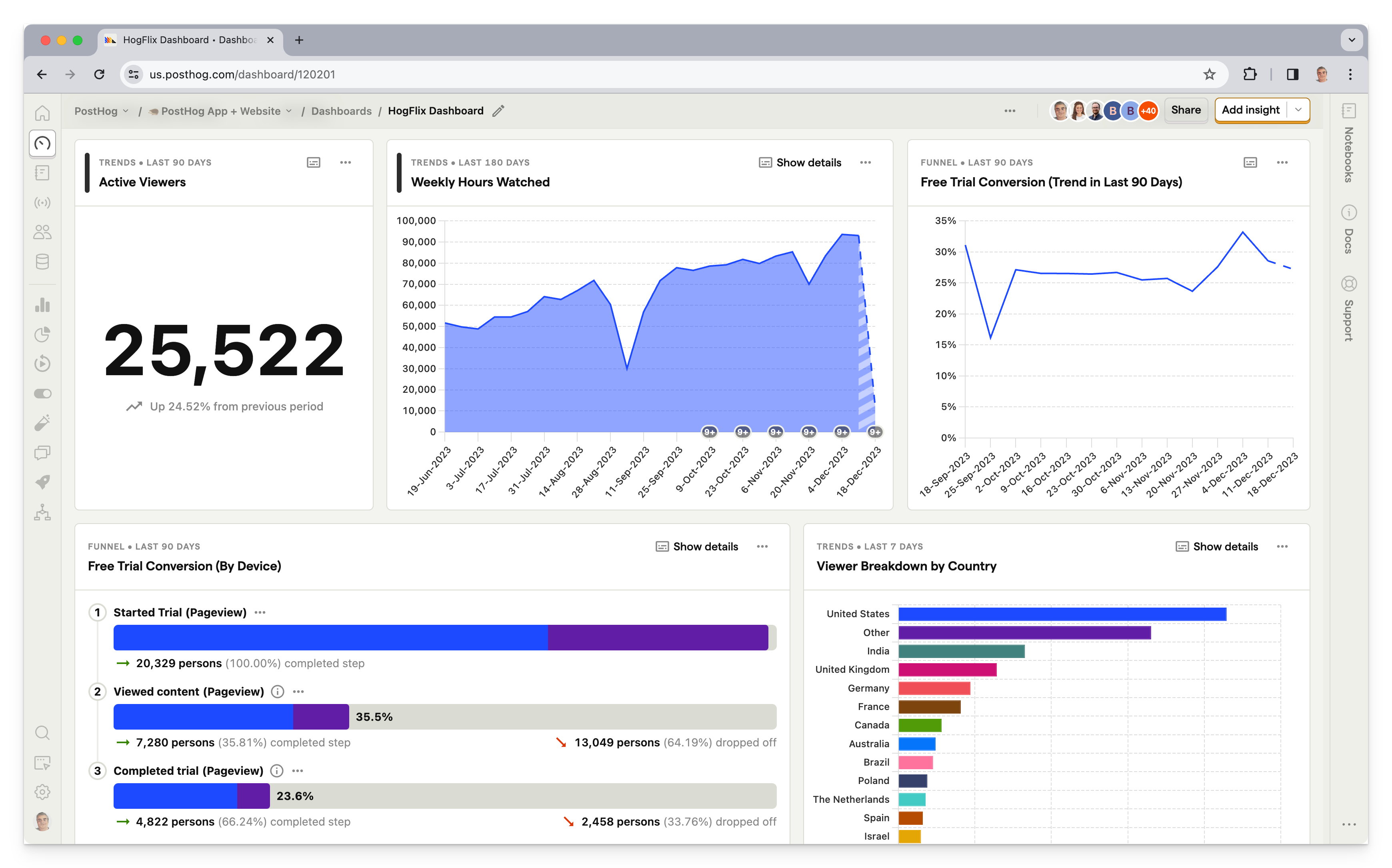
PostHog (that's us 👋) is an all-in-one developer platform that includes web analytics, product analytics, session replay, error tracking, experiments, user surveys, and more – pretty much everything you need to track user behavior in an app or website.
This means it's not just a GA4 alternative, but also a replacement for tools like Mixpanel, LaunchDarkly, and FullStory.
Typical PostHog users are engineers and product managers at startups and mid-size companies, such as ElevenLabs, Supabase, and Lovable.
Like GA4, PostHog is an event-based platform. It's priced per event captured, though it offers a generous 1 million events for free each month, so many users can use it for free.
How does PostHog compare to GA4?
PostHog gives you all the web analytics of GA4 and far more on top. Where GA4 is a marketing analytics tool, PostHog is a full product development platform. This means that, in addition to tracking user behavior, you can also use PostHog to run A/B tests, set up feature flags, record user sessions, and even survey users.
GA4 doesn't have any of these features built-in, so you'd need to integrate with other tools to get the same functionality.
Read our PostHog and Google Analytics comparison for an in-depth look at the differences
Main differences between PostHog and GA4
- PostHog includes session replay, feature flags, A/B testing, error tracking, and surveys; GA4 offers none of these.
- GA4 integrates natively with Google Ads, Search Console, and the broader Google Marketing Platform; PostHog doesn't have native ad platform integrations yet, but marketing analytics features are currently in beta.
- PostHog offers EU hosting with data stored exclusively in the EU; GA4 doesn't offer EU-only data residency.
- PostHog is HIPAA-ready with a BAA available; GA4 is not HIPAA-compliant.
- PostHog is open source; GA4 is closed source.
- PostHog offers cookieless tracking; GA4 relies on cookies by default.
Main similarities between PostHog and GA4
- Both offer web analytics with traffic breakdown, UTM tracking, and conversion tracking.
- Both support event-based tracking with autocapture and custom events.
- Both are SOC 2 certified.
- Both support real-time data views.
- Both offer free tiers that are sufficient for most small to mid-size teams.
- Both integrate with Segment, Zapier, and other popular tools.
Bottom line
PostHog is the best GA4 alternative for engineering and product teams who need more than just web analytics. It covers everything GA4 does and adds a full stack of product tools, all with transparent pricing and a generous free tier.


Install PostHog with one command
Paste this into your terminal and make AI do all the work.

2. Matomo

- Best for: Content, marketing and e-commerce websites
- Tracking method: Session-based
- GDPR compliance: ✔
- GA data import: ✔
Matomo is one of the most popular Google Analytics alternatives around. Like UA, it's based on a session-based tracking model, and it even allows new users to import data from an existing Google Analytics account.
It also shares some weaknesses inherent in Universal Analytics. While Matomo has added more advanced analytics features, it's better suits traditional website analytics than tracking desktop and mobile apps. Like PostHog, it's open source, so can be self-hosted if you prefer.
How does Matomo compare to GA4?
Matomo is session-based like Universal Analytics, making it a more natural migration path for teams who preferred the old Google Analytics model. It gives you full data ownership and GDPR compliance without the complexity of GA4.
Main differences between Matomo and GA4
- Matomo is session-based like Universal Analytics; GA4 is event-based. Matomo is a more natural migration for UA users.
- Matomo can import historical data from Google Analytics; GA4 cannot import historical data from other tools.
- Matomo can be self-hosted for full data ownership; GA4 is cloud-only.
- Matomo doesn't sample data on any plan; GA4 free applies sampling to large exploration queries.
- GA4 integrates natively with Google Ads and Search Console; Matomo doesn't.
- GA4 has a large free tier; Matomo's cloud is paid (free for self-hosted).
Main similarities between Matomo and GA4
- Both offer web analytics with traffic breakdown, referrers, and conversion tracking.
- Both support custom event tracking.
- Both offer goal tracking and funnel analysis.
- Both support integrations with popular CMS and ecommerce platforms.
Bottom line
Matomo is closest you'll get to a Universal Analytics-style experience. It's session-based and was explicitly conceived as European alternative to Google Analytics. It has plenty of features, too, though some may find the interface a little dated. It's especially well-suited to publishers, privacy-conscious organizations, and teams in regulated industries.
3. Kissmetrics
- Best for: Marketing and e-commerce websites
- Tracking method: Event-based
- GDPR compliance: ✔
- GA data import: ✖
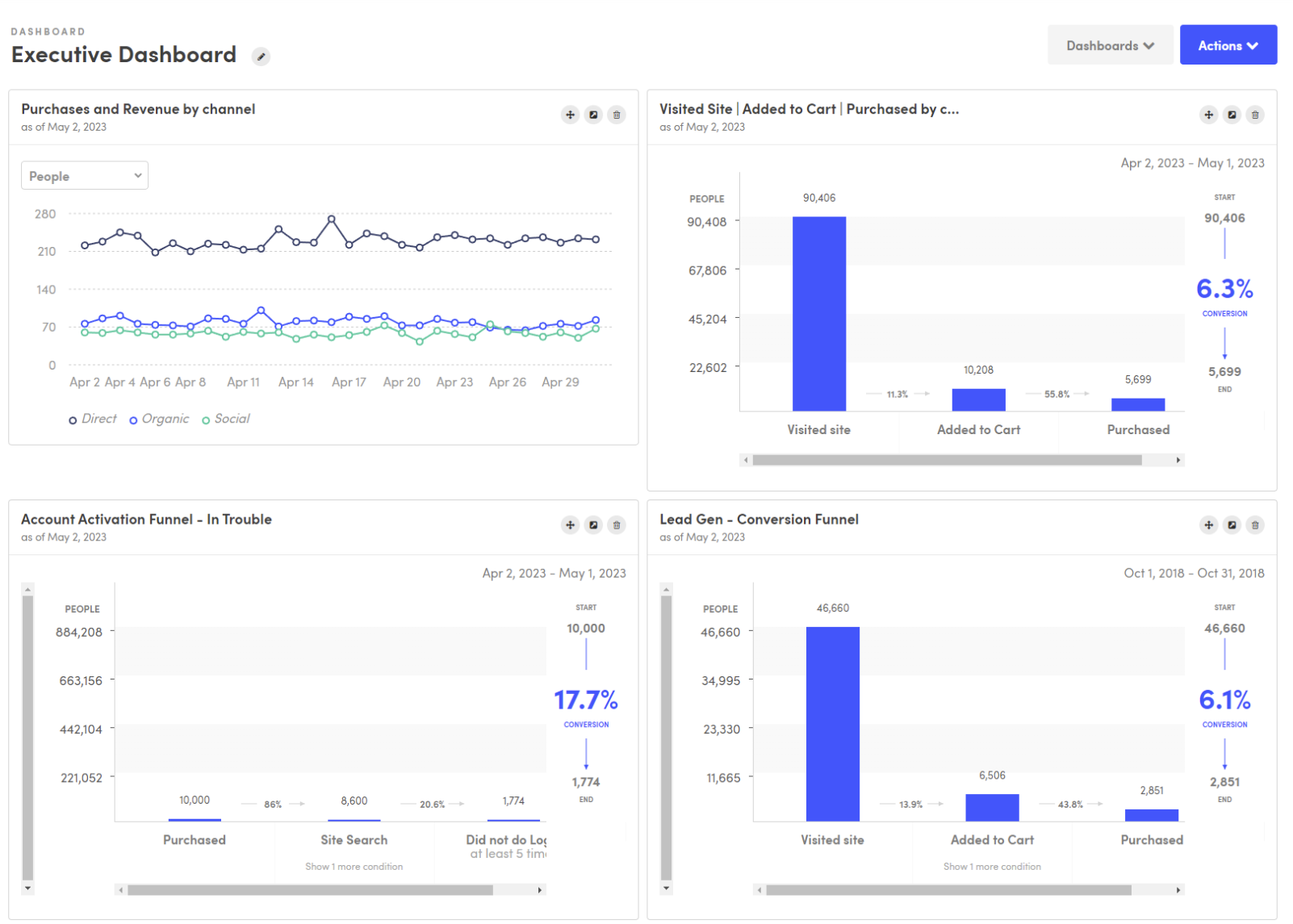
Kissmetrics is all about tracking marketing ROI. As a result, it doesn't track what Kissmetrics deems vanity metrics like bounce rate, time on page, exits, etc. It does, however, track most essential website metrics, and makes it easy to understand the impact of organic and paid marketing activity.
One of its key features is the Populations report, which groups users into key cohorts, such as those who have recently activated trials, or are at risk of churning. You can also create custom funnel reports, and track user paths through your website.
How does Kissmetrics compare to GA4?
Kissmetrics and GA4 serve different masters. GA4 is built for traffic and marketing attribution. Kissmetrics is built for understanding customers and driving revenue – it intentionally excludes "vanity metrics" like bounce rate and time on page, focusing instead on what actually drives growth.
Main differences between Kissmetrics and GA4
- Kissmetrics is person-based (every action tied to an individual); GA4 is event-based with session context.
- Kissmetrics focuses on revenue analytics and customer lifetime value; GA4 focuses on traffic, acquisition, and marketing attribution.
- Kissmetrics deliberately excludes "vanity metrics" like bounce rate; GA4 tracks them all.
- GA4 is free; Kissmetrics starts at $25.99/month.
- GA4 integrates natively with Google Ads and Search Console; Kissmetrics does not.
- Kissmetrics includes email campaign automation; GA4 does not.
Main similarities between Kissmetrics and GA4
- Both offer funnel analysis and conversion tracking.
- Both support cohort analysis.
- Both track custom events and user behavior.
- Both offer A/B testing capabilities.
Bottom line
Kissmetrics is a great platform for sophisticated marketing teams who want to track the impact of their work on revenue. It's overkill for basic website analytics use cases, but a good option for mature businesses looking for a robust alternative to Google Analytics.
4. TelemetryDeck
- Best for: Mobile apps
- Tracking method: Event-based
- GDPR compliance: ✔
- GA data import: ✖
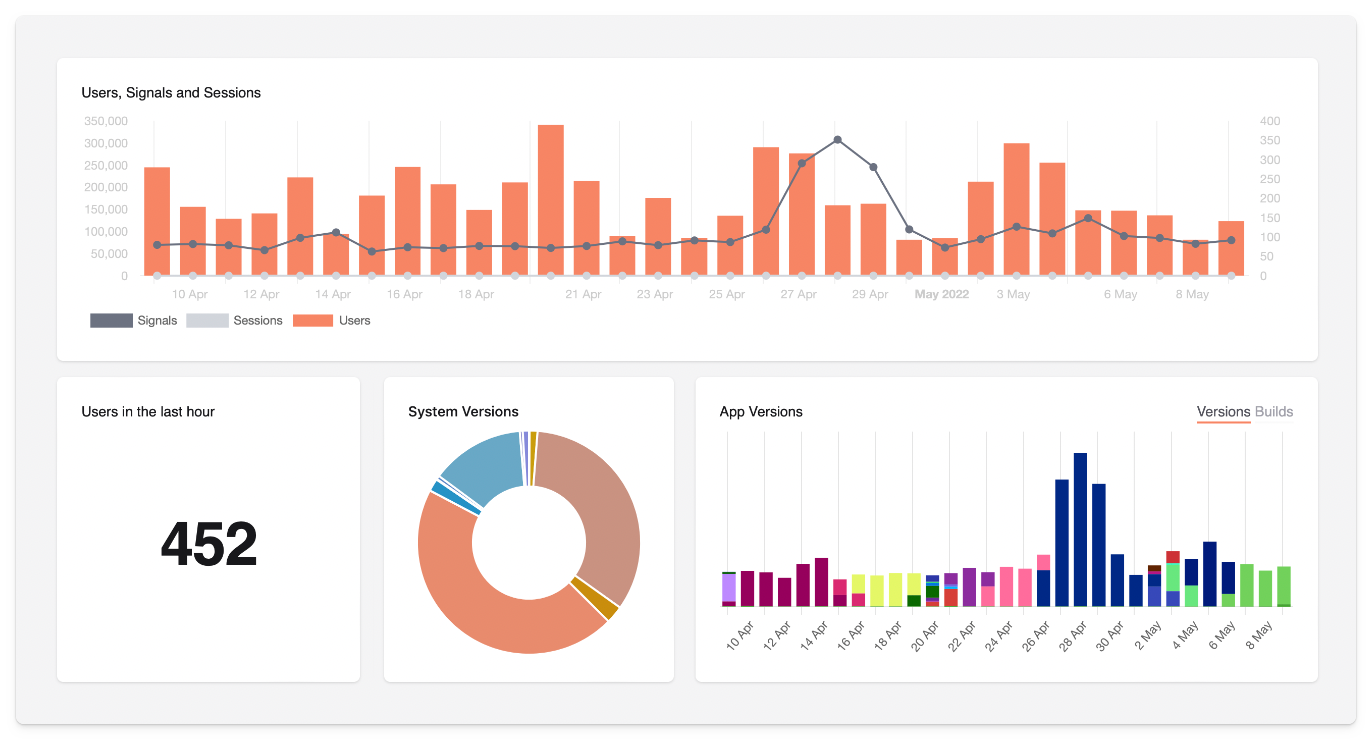
While it can be used on websites, TelemetryDeck is primarily a privacy-minded analytics tool for mobile apps. As such, it uses an event-based tracking model – TelemetryDeck calls them signals. It has first-party SDKs for Swift (iOS, macOS etc. apps), Kotlin (Android and Java apps), and Javascript (Node and web apps).
TelemetryDeck makes it easy for app developers to track things like active users, OS version, app version, and basic user metadata like user location. It also supports basic retention and conversion funnel insights. TelemetryDeck doesn't collect any personally identifiable metadata, so you don't need tracking consent banners.
How does TelemetryDeck compare to GA4?
TelemetryDeck does far less than GA4 by design. It's intentionally lean – no user profiles, no revenue tracking, no ad attribution. What it offers is privacy-safe app analytics with zero compliance overhead, which is a compelling tradeoff for many indie developers and privacy-focused teams.
Main differences between TelemetryDeck and GA4
- TelemetryDeck collects no personally identifiable information by design; GA4 collects user-level data and requires GDPR consent management.
- TelemetryDeck doesn't require cookie consent banners; GA4 does in most EU contexts.
- TelemetryDeck is focused on app analytics (iOS, Android, Flutter, React Native); GA4 is primarily web-focused.
- GA4 has a large free tier but no transparent pricing; TelemetryDeck has a free tier (100k signals/month) with transparent, usage-based pricing after that.
- GA4 integrates with Google Ads; TelemetryDeck has no ad platform integrations.
- TelemetryDeck lacks user profiles and revenue tracking; GA4 includes both.
Main similarities between TelemetryDeck and GA4
- Both support event-based tracking.
- Both offer funnels and retention analysis.
- Both support multiple platforms including iOS, Android, and web.
- Both offer real-time dashboards.
Bottom line
TelemetryDeck is a good option for those who want basic app analytics, but it falls short of feature parity with GA4. It's not a full GA4 replacement for teams that need revenue tracking, ad attribution, or user profiles – but it's a great fit for indie developers and privacy-first teams.
5. Plausible
- Best for: Content and marketing websites
- Tracking method: Session-based
- GDPR compliance: ✔
- GA data import: ✔
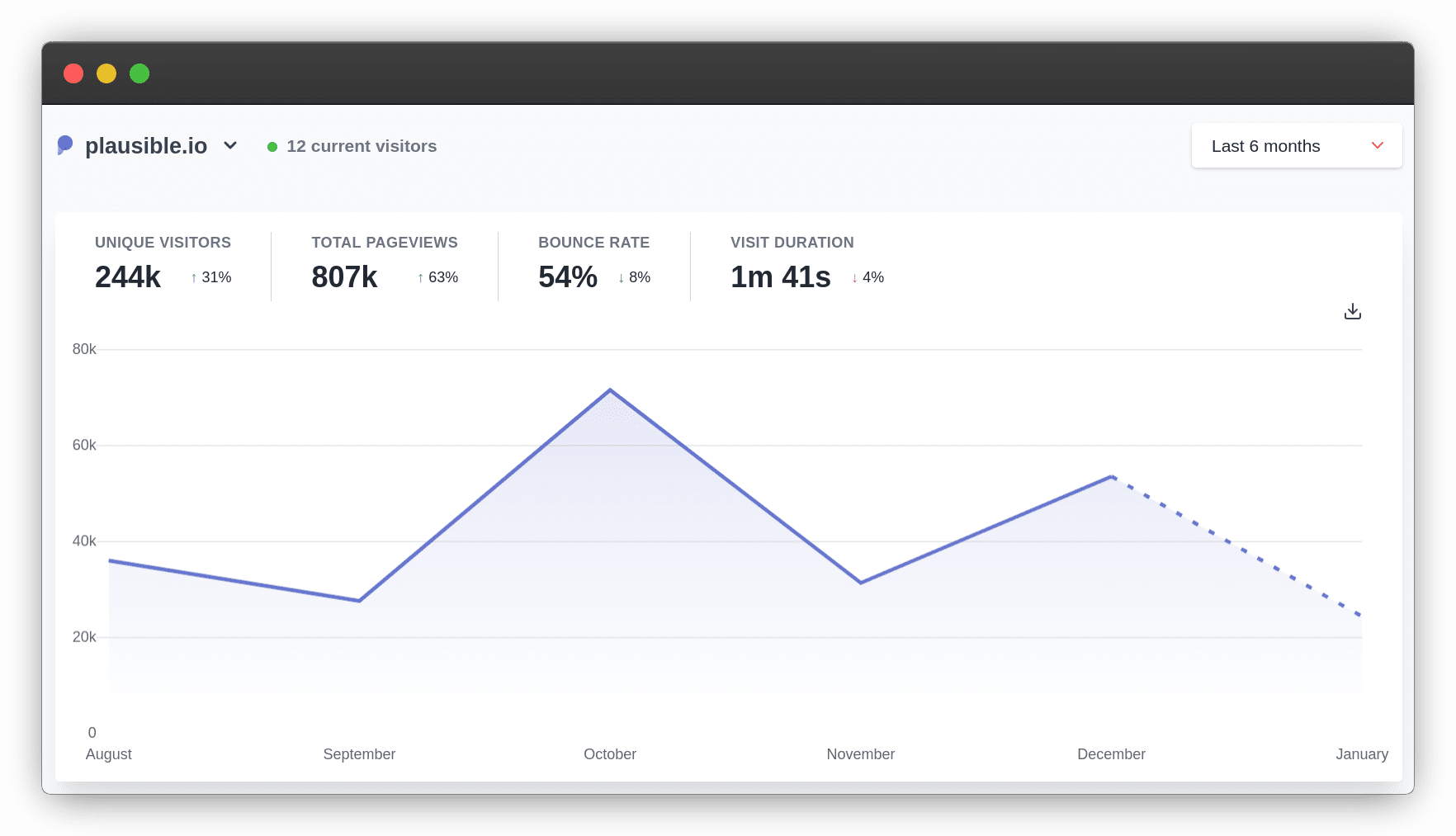
Plausible is a leader in the trend of lightweight, privacy-orientated analytics tools. It's easy to use and doesn't collect any personally identifiable information. This makes it ideal for complying with GDPR, but this comes at the cost of functionality.
Plausible can only track very basic website metrics like pageviews, session duration, and referrer information. This makes it useless for apps, and significantly less powerful than Google Analytics and other alternatives in this list.
But, if you just want basic website analytics, it gets the job done, and won't adversely impact the performance of your website thanks to its lightweight tracking script.
How does Plausible compare to GA4?
Plausible covers the basics of web analytics without the complexity. It's not a like-for-like GA4 replacement – it lacks user profiles, advanced segmentation, and the depth of reporting GA4 offers. But for teams who just want simple, trustworthy traffic data without GDPR headaches, it's hard to beat.
Main differences between Plausible and GA4
- Plausible collects no personal data and requires no cookie consent banners; GA4 does.
- Plausible's script is under 1KB; GA4's is ~45KB.
- GA4 has far deeper analytics: user profiles, cohorts, advanced segmentation, predictive insights. Plausible is intentionally basic.
- Plausible is open source and can be self-hosted; GA4 is cloud-only.
- GA4 integrates with Google Ads; Plausible doesn't.
Main similarities between Plausible and GA4
- Both offer web analytics with traffic sources, pageviews, and bounce rate.
- Both support UTM tracking and campaign attribution.
- Both support custom event tracking and goal conversion.
- Both can import data from Google Analytics.
Bottom line
While it lacks many of the advanced features of GA4, Plausible is a good option for content and marketing teams who just want easy to use, basic website analytics.
6. Vercel Web Analytics
- Best for: Content and marketing websites
- Tracking method: Event-based
- GDPR compliance: ✔
- GA data import: ✖
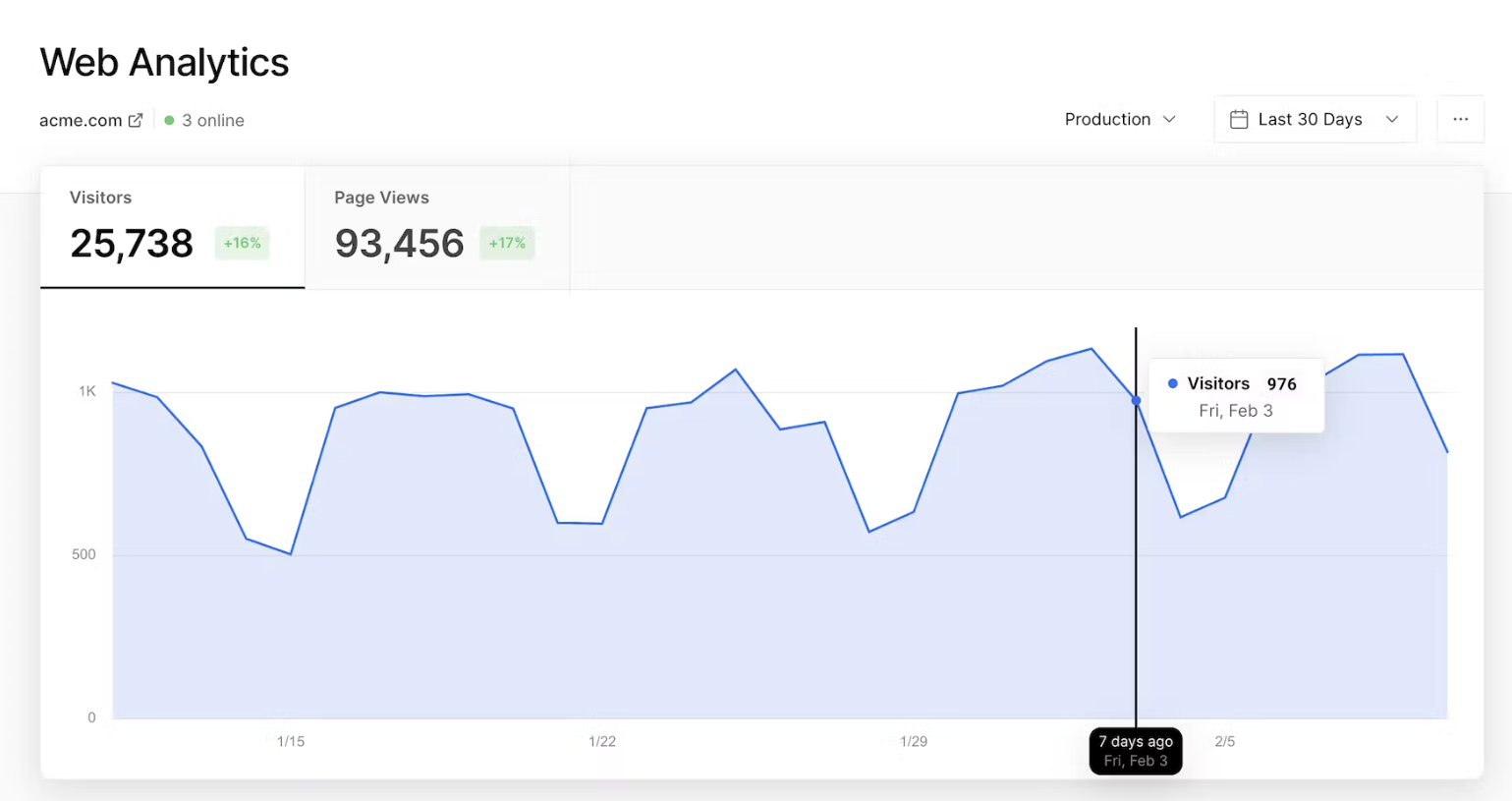
Vercel Web Analytics is a privacy-friendly analytics tool included in all Vercel plans. Like Plausible, it tracks basic website metrics like pageviews, unique users, time on page, and referrers. It doesn't collect personally identifiable information, so can be used without cookie banners.
Other useful features include a Speed Insights tool for keeping track of your website's Core Web Vitals. You can also set up custom events to track conversions.
How does Vercel Web Analytics compare to GA4?
Vercel Web Analytics is a convenience product, not a GA4 replacement. If you're already on Vercel, it's worth enabling for basic traffic data. If you need more depth – funnels, user paths, retention, ad attribution – you'll need a dedicated analytics tool.
Main differences between Vercel Web Analytics and GA4
- Vercel Analytics collects no PII and requires no cookie consent; GA4 does.
- GA4 is far more capable: user profiles, cohorts, segmentation, funnel analysis, ad attribution, and more.
- Vercel Analytics only works for sites hosted on Vercel; GA4 works anywhere.
- Vercel Analytics includes Core Web Vitals monitoring out of the box; GA4 doesn't.
Main similarities between Vercel Web Analytics and GA4
- Both offer basic web analytics: pageviews, visitors, and referrers.
- Both support custom event tracking and conversion goals.
- Both offer real-time data.
Bottom line
Vercel Web Analytics is a nice value-add for any front-end dev using Vercel's frontend-as-a-service. There's certainly no need to deploy another privacy-first analytics tool (e.g. Plausible, Fathom) if you're already using Vercel, though it falls a long way short of a genuine Google Analytics alternative. If you need more than what it offers, consider deploying PostHog or Matomo.
7. Piwik PRO
- Best for: Content, marketing and e-commerce websites
- Tracking method: Session-based
- GDPR compliance: ✔
- GA data import: ✖
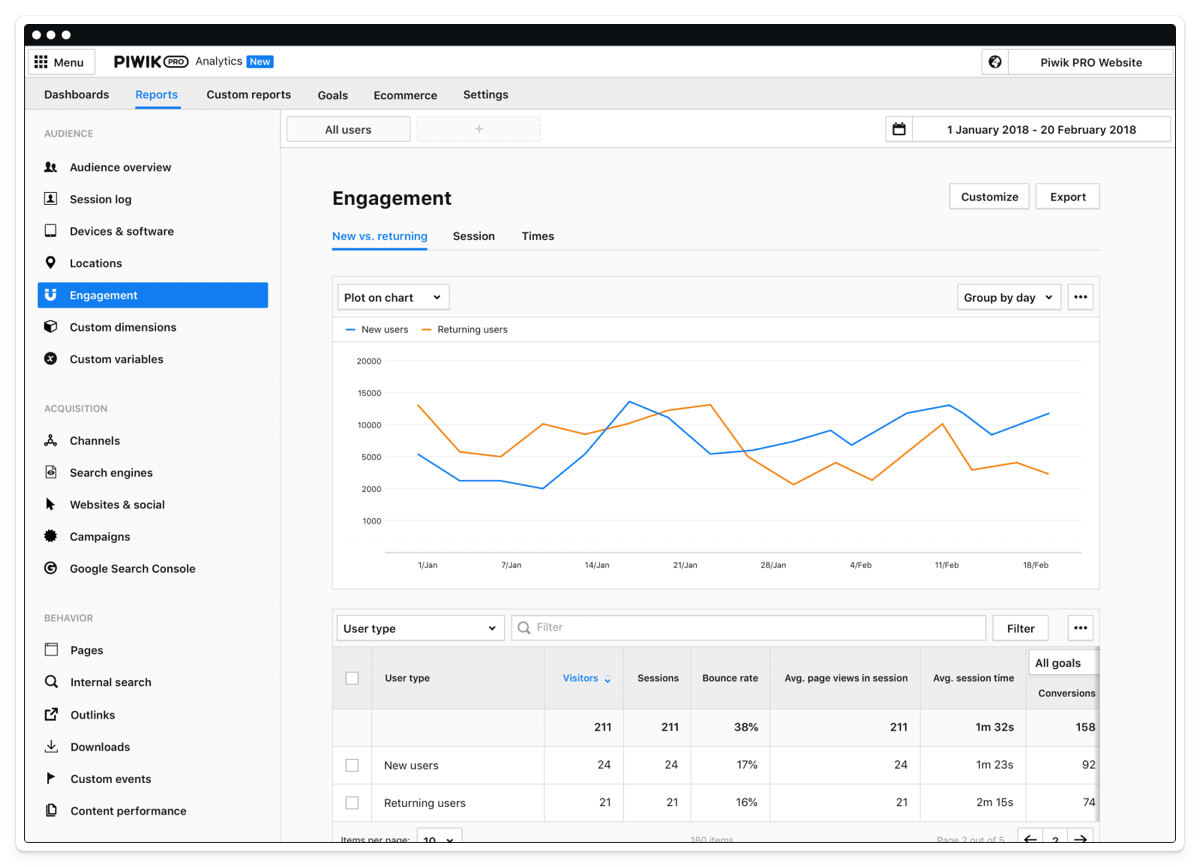
Piwik PRO is a commercial spinoff of Matomo – Matomo used be called Piwik. As such, there are some similarities between the two, such as session-based tracking and superficial UX similarities.
Piwik PRO's main differentiators are enterprise level support and the integration of a customer data platform (CDP). Like Matomo, it also puts an emphasis on privacy compliance by integrating a consent manager.
How does Piwik PRO compare to GA4?
Piwik PRO is particularly strong for regulated industries and enterprise teams that need GDPR compliance, consent management, and EU data residency in a single package. It's less self-serve than GA4 but offers more control.
Main differences between Piwik PRO and GA4
- Piwik PRO includes a built-in consent manager and CDP; GA4 requires separate tools for both.
- Piwik PRO can be self-hosted on-premise; GA4 is cloud-only.
- GA4 has a large free tier but no transparent pricing; Piwik PRO has a free tier (up to 500k actions/month) with paid plans for higher volumes.
- GA4 integrates natively with Google Ads and Search Console; Piwik PRO doesn't.
- Piwik PRO is session-based like Universal Analytics; GA4 is event-based.
- Piwik PRO requires a sales conversation for enterprise features; GA4 is entirely self-serve.
Main similarities between Piwik PRO and GA4
- Both offer web analytics with traffic breakdown, referrers, and conversion tracking.
- Both support custom event tracking.
- Both offer funnels and user journey analysis.
- Both support integrations with popular marketing tools.
Bottom line
Unsurprisingly, Piwik PRO's roots in Matomo make it a popular choice for users who are familiar with Universal Analytics. It's less feature-rich than Matomo in some respects, but may be a better choice for larger organizations who require more support and scale.
8. Fathom
- Best for: Content and marketing websites
- Tracking method: Session-based
- GDPR compliance: ✔
- GA data import: ✔
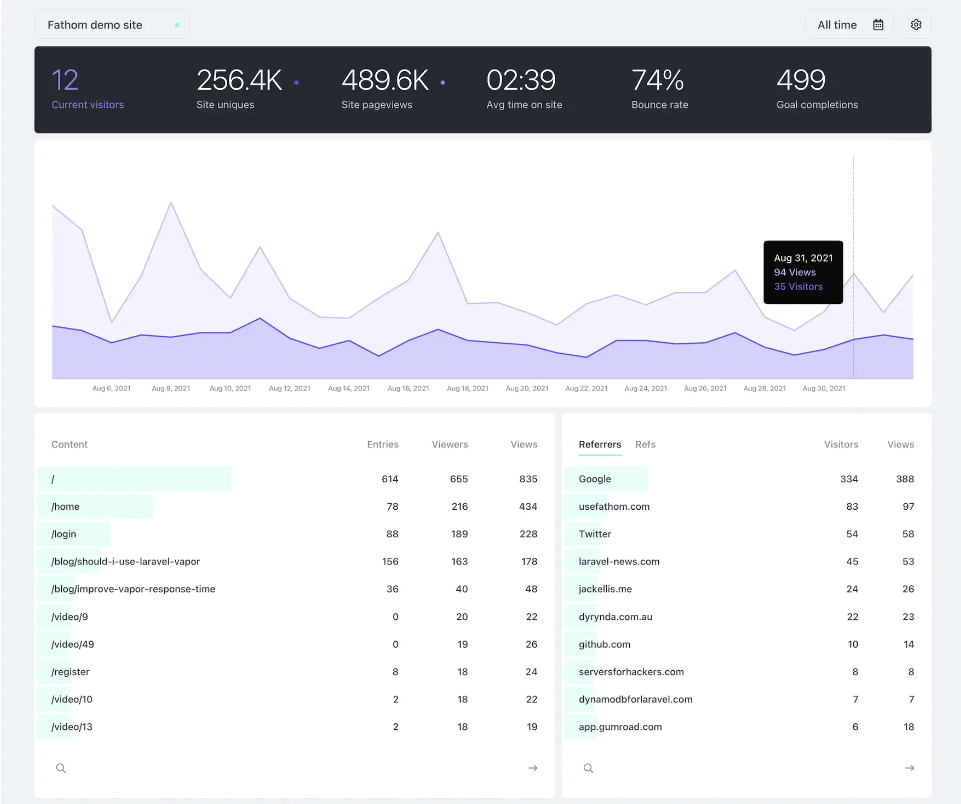
Fathom is another leading privacy-focused analytics tool that's similar in scope to Plausible. It's ideal for small and medium-size marketing websites, but it lacks the deeper features typical Google Analytics users will demand.
For a deep dive, check out PostHog vs Fathom Analytics too.
How does Fathom compare to GA4?
Like Plausible, Fathom is intentionally simple. It provides clean, unsampled web analytics data without the privacy concerns or interface complexity of GA4. It's not for teams that need advanced segmentation, user-level data, or ad attribution – but it's excellent for what it does.
Main differences between Fathom and GA4
- Fathom collects no personal data and requires no cookie consent banners; GA4 does.
- Fathom is intentionally basic – no user profiles, cohorts, or advanced segmentation.
- Fathom is paid (starts at $15/month); GA4 is free.
- GA4 has far deeper analytics capabilities and integrates with Google Ads.
- Fathom uses EU-owned infrastructure for all data processing; GA4 doesn't offer EU-only data residency.
- Fathom includes uptime monitoring; GA4 does not.
Main similarities between Fathom and GA4
- Both offer web analytics with traffic sources, pageviews, and bounce rate.
- Both support UTM tracking and campaign attribution.
- Both support custom event tracking and goal conversion.
- Both can import data from Google Analytics.
Bottom line
There isn't much to choose between Fathom and Plausible. Again, if you want lightweight website analytics without the feature bloat of Google, you can't go wrong with Fathom.
9. Counter
- Best for: Content and personal websites
- Tracking method: Session-based
- GDPR compliance: ✔
- GA data import: ✖
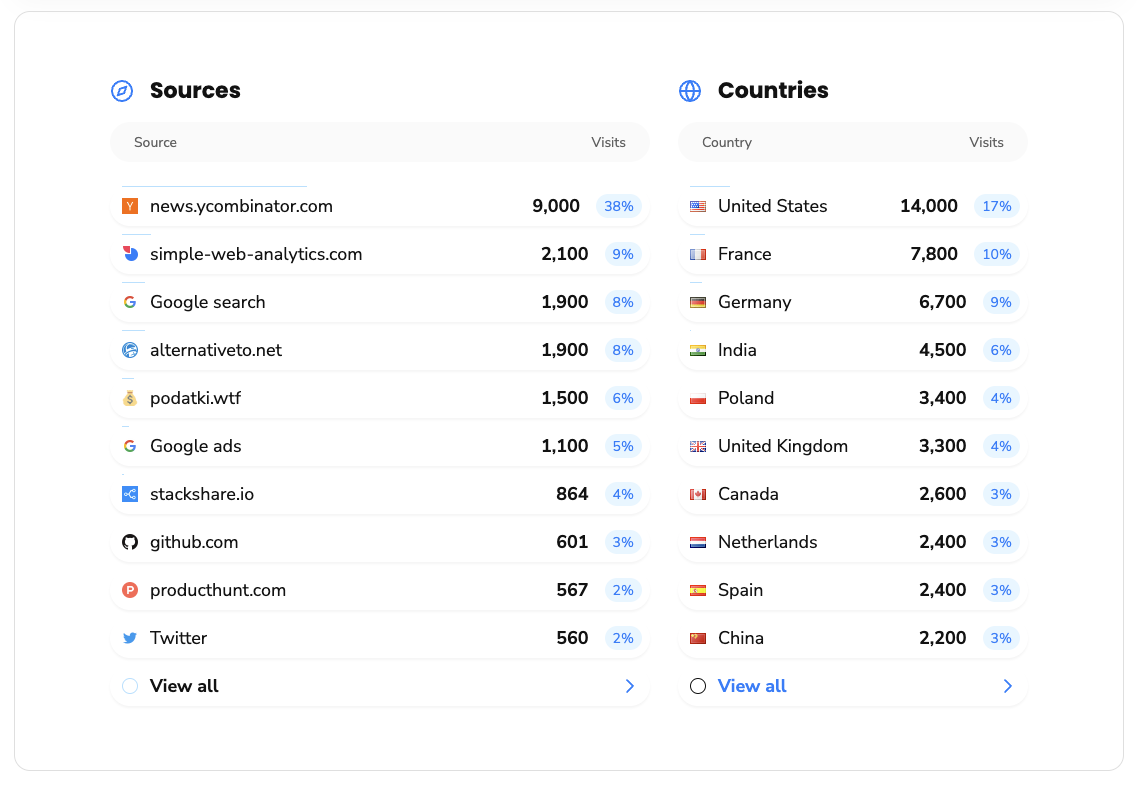
Counter is a free and open source analytics tool that operates a "pay what you want" model. It's by no means a feature-complete alternative to GA4, but it's ideal if you want to track basic website activity like visits, referral data, and user properties (device, platform, browser etc.).
Counter's creators can offer it for free because it only collects aggregated data, reducing the complexity and load on the server, while also improving data privacy. To count unique users, Counter uses a combination of techniques including the browser's cache, sessionStorage, and referrer inspection.
How does Counter compare to GA4?
Counter is about as minimal as analytics gets. It does just enough to answer "how many people visited my site and where did they come from?" For personal projects, blogs, and indie developers who don't need anything more, it's a compelling free alternative.
Main differences between Counter and GA4
- Counter only collects aggregated data; GA4 collects individual user-level event data.
- Counter is free with no usage limits; GA4 is also free but with data retention and sampling limits.
- Counter's feature set is extremely minimal; GA4 offers deep analytics, segmentation, and attribution.
- Counter has no integrations with ad platforms or external tools; GA4 connects to Google's entire marketing stack.
- Counter can be self-hosted; GA4 cannot.
- Counter requires no consent banners; GA4 requires them in most EU contexts.
Main similarities between Counter and GA4
- Both offer basic web analytics: visits, referrers, and device breakdown.
- Both require no personally identifiable information.
Bottom line
Counter is a great choice if you have basic needs. It does most of the things the popular privacy-first analytics tools offer, but does so for free. The simple interface is easy to understand, though it doesn't allow you to drill down deeply into individual page performance like Fathom or Plausible.
Which GA4 alternative should you choose?
Here's a quick guide based on what you need:
For engineering and product teams who need more than web analytics:
- PostHog – Web analytics, product analytics, session replay, feature flags, A/B testing, error tracking, surveys, and more in one developer platform. Best if you want to replace GA4 and several other tools with transparent pricing.
For a familiar Universal Analytics-style replacement:
- Matomo – Session-based analytics with GA data import and self-hosting. Best for teams migrating from Universal Analytics who want full data ownership.
- Piwik PRO – Best for enterprise teams in regulated industries (healthcare, finance, government) who need a CDP and consent manager alongside analytics.
For revenue and marketing analytics:
- Kissmetrics – Person-based analytics tied to revenue and LTV. Best for e-commerce and SaaS teams who want to understand which channels and features drive revenue.
For privacy-first lightweight web analytics:
- Plausible – Clean, GDPR-compliant web analytics with no cookies or consent banners. Best for content sites and marketing websites that want simple, trustworthy data.
- Fathom – Very similar to Plausible, with EU-owned infrastructure and uptime monitoring. Best for privacy-conscious teams willing to pay slightly more.
- Counter – Free, minimal web analytics. Best for personal projects and indie developers who just need basic traffic data.
For app developers:
- TelemetryDeck – Privacy-safe analytics for iOS, Android, Flutter, and React Native apps with no consent banners required.
- PostHog – Full-featured analytics for iOS, Android, React Native, and Flutter with session replay, feature flags, and error tracking. Best if you need more than privacy-safe event counts.
For teams already on Vercel:
- Vercel Web Analytics – Easiest to implement with zero configuration. Not a full GA4 replacement but good enough for basic traffic data.
For early-stage startups:
- PostHog – A generous free tier (1M events, 5,000 replays, 1M feature flag requests) plus up to $50k in credits for eligible startups. One platform that scales from first users to product-market fit.
Is PostHog right for you?
Here's the (short) sales pitch.
We're biased, obviously, but we think PostHog is the best GA4 replacement if:
- You need more than web analytics – session replay, feature flags, A/B testing, and error tracking all in one place.
- You want transparent, usage-based pricing without a sales call.
- You're an engineering or product team who wants SQL access, open-source code, and APIs.
- You want to try before you buy (we're self-serve with a generous free tier).
It's completely free to get started – no credit card required. Our AI setup wizard handles configuration in minutes, or check out our docs to do it yourself.
Install PostHog with one command
Paste this into your terminal and make AI do all the work.
Frequently asked questions
Why are people looking for Google Analytics alternatives?
Common reasons include: GA4 is harder to use than Universal Analytics, data sampling affects accuracy on large exploration queries, the 14-month data retention limit on the free tier is restrictive, privacy concerns and GDPR compliance are complicated under GA4, and many teams need more than web analytics – session replay, feature flags, error tracking – that GA4 simply doesn't offer.
What's the best free Google Analytics alternative?
PostHog offers the most complete free tier: 1 million analytics events, 5,000 session replays, 1 million feature flag requests, and 1,500 survey responses per month. Plausible and Fathom are both paid but have free trials. Counter is completely free.
What's the best privacy-friendly Google Analytics alternative?
For lightweight web analytics, Plausible and Fathom are the strongest options – both are cookieless, GDPR-compliant by default, and collect no personally identifiable information. TelemetryDeck is the best option for app developers who need privacy-safe analytics without consent banners. PostHog and Matomo both support EU hosting, cookieless tracking, and HIPAA compliance for teams with more advanced requirements.
See our guide to GDPR-compliant analytics tools for a full breakdown.
What's the best GA4 alternative for startups?
PostHog is the best option for early-stage companies. Beyond the generous free tier, startups can apply for PostHog for Startups to get $50,000 in additional credits. One platform that covers analytics, replays, feature flags, and more from day one means you don't have to swap tools as you scale.
What's the best GA4 alternative for developers?
PostHog is built for developers – SQL access, MCP server for AI coding tools, open-source codebase, extensively documented APIs, and SDKs for every major platform. TelemetryDeck is a good lightweight option for app developers who prioritize privacy.
What's the best GA4 alternative for session replay?
PostHog includes session replay with console logs, network monitoring, a DOM explorer, and performance metrics – tightly integrated with analytics.
For standalone session replay, see our guide to the best session replay tools.
Can I migrate historical data from GA4 to another tool?
Matomo and Plausible both support importing data from Google Analytics. PostHog doesn't directly import GA4 data, but you can run both tools in parallel during a transition period and use PostHog's historical migration docs for guidance.
Does GA4 have session replay?
No. GA4 does not include session replay. If you need session replay alongside web analytics, consider PostHog (which integrates replay with analytics, feature flags, and error tracking) or Hotjar (now part of Contentsquare).
Does GA4 have feature flags or A/B testing?
No. GA4 does not offer native feature flags or A/B testing. Google Optimize (GA4's A/B testing product) was shut down in 2023. For feature flags and experimentation tightly integrated with analytics, PostHog is the best alternative.
See our guide to the best LaunchDarkly alternatives for more options.
What are the best web analytics tools in 2026?
The top web analytics tools in 2026 include:
- PostHog – Best all-in-one for engineering teams wanting analytics, replay, feature flags, and more
- Plausible – Best lightweight, privacy-focused option
- Matomo – Best self-hosted GA alternative with full data ownership
- Fathom – Best for privacy-conscious teams wanting simple analytics with EU infrastructure
- Amplitude – Best for enterprise product analytics with a built-in CDP
- Mixpanel – Best for product managers wanting event-based analytics
See our full guide to the best web analytics tools for more options.
PostHog is the leading platform for building self-driving products. With a full suite of developer tools – AI observability, product analytics, session replay, feature flags, experiments, error tracking, logs, and more – PostHog captures all the context agents need to diagnose problems, uncover opportunities, and ship fixes. A data warehouse and CDP tie it all together, unifying that context into one source agents can read across. You can steer it all from Slack, the web app, the desktop (PostHog Code), or your own editor via the MCP.